Magisk Issues and Troubleshooting
All |ALL PROBLEM SOLUTIONS ARE |
your problems solved under |PROBLEM SOLUTIONS ARE AVAILABLE |
one roof All problem solutions |SOLUTIONS ARE AVAILABLE HERE, |
are available here, including |ARE AVAILABLE HERE, INCLUDING |
app crashes, Magisk APK, |AVAILABLE HERE, INCLUDING APP |
Kitsune, Alpha, Beta, and |HERE, INCLUDING APP CRASHES, |
canary not installed, banking |INCLUDING APP CRASHES, MAGISK |
app detection, and SafetyNet |APP CRASHES, MAGISK APK, |
failures. Every issue has |CRASHES, MAGISK APK, KITSUNE, |
a solution here. If |MAGISK APK, KITSUNE, ALPHA, |
you have any other |APK, KITSUNE, ALPHA, BETA, |
issues, feel free to |KITSUNE, ALPHA, BETA, AND |
comment below. Is This helpful, |ALPHA, BETA, AND CANARY |
please rate your experience! [emoji_reactions] Flash Magisk v23 again |ISSUES, FEEL FREE TO |
→ boot phone → |FEEL FREE TO COMMENT |
up→date to 26.3 via |FREE TO COMMENT BELOW. |
app. Connect |AND TROUBLESHOOTING BOOTLOOP |
to Wi-Fi, reopen Magisk |TROUBLESHOOTING BOOTLOOP AFTER |
→ root will be | BOOTLOOP AFTER FLASHING |
detected. Re-flash |WHEN YOU FLASH THE |
Magisk to root again |YOU FLASH THE LATEST |
if needed. Flash |PHONE GOES INTO BOOTLOOP. |
Magisk v23 again → |GOES INTO BOOTLOOP. SOLUTION: |
boot phone → up→date |INTO BOOTLOOP. SOLUTION: FLASH |
to 26.3 via app. Connect to |MAGISK VERSION (V23) |
Wi-Fi, reopen Magisk → |VERSION (V23) ISSUE: |
root will be detected. Re-flash Magisk |INTO BOOTLOOP. CAUSE: OLD |
to root again if |BOOTLOOP. CAUSE: OLD MAGISK |
needed. Then flash Magisk |CAUSES CONFLICTS. SOLUTION: BOOT |
(latest). Flash |FILE MANAGER → DATA |
Magisk cleanly without SuperSU. Repeat |COMPLETELY. FLASH MAGISK V23 |
the boot.img + Magisk |FLASH MAGISK V23 AGAIN |
flash process. Cause: Solution: Cause: Solution: Cause: Solution: Let Magisk complete the |THE PHONE DOESN’T SHOW |
flashing process and reboot |PHONE DOESN’T SHOW THE |
again. Cause: Solution: Cause: Solution: Issue: Cause: Solution: Issue: Cause: Issue: Cause: Issue: Cause: Solution: Issue: Cause: Solution: Issue: Cause: Issue: Cause: Issue: Cause: Solution: Flash the compatible version |ONLY THE STOCK KERNEL |
(e.g., v25.4) through Magisk |THE STOCK KERNEL WORKS. |
Manager. Issue: Cause: Solution: After reboot, the |FLASHED WITHOUT UNROOTING FIRST, |
module will show Successfully |WITHOUT UNROOTING FIRST, THE |
Installed in the modules |UNROOTING FIRST, THE PATCHING |
section. Issue: Cause: Solution: Check |USING MAGISK FIRST. REBOOT |
Magisk → Modules section; |MAGISK FIRST. REBOOT THE |
the module will now |FIRST. REBOOT THE PHONE |
show as Active and |REBOOT THE PHONE TO |
Installed. Issue: Cause: Solution: If required, enable Zygisk |OLDER MAGISK VERSION (V23) |
in Magisk settings and |MAGISK VERSION (V23) |
reboot again. Issue: Cause: Solution: After reboot, Shamiko |STILL GOES INTO BOOTLOOP. |
will be up and |GOES INTO BOOTLOOP. CAUSE: |
running. Issue: Cause: Solution: Future updates |FOLDER INSIDE /DATA/, WHICH |
of Magisk stable/beta will |INSIDE /DATA/, WHICH CAUSES |
support the new format, |/DATA/, WHICH CAUSES CONFLICTS. |
but for now Canary |WHICH CAUSES CONFLICTS. SOLUTION: |
is required Issue: Cause: Solution: Magisk will now |VIA APP. MAGISK |
create a stock boot |APP. MAGISK FLASHES |
backup, allowing the Restore | MAGISK FLASHES SUCCESSFULLY, |
Images option to work |MAGISK FLASHES SUCCESSFULLY, BUT |
for future OTA updates. Issue: Cause: Solution: Issue: Cause: Solution: Issue: Cause: Solution: Try installing the |PHONE IS STILL “NOT |
APK in Safe Mode |IS STILL “NOT ROOTED” |
to bypass third-party app |STILL “NOT ROOTED” |
interference (optional advanced step). Issue: Cause: Solution:Magisk Issues and Troubleshooting
Browse |BETA, AND CANARY NOT |
your Magisk Issues and |AND CANARY NOT INSTALLED, |
Troubleshooting
When you flash the |INSTALLED, BANKING APP DETECTION, |
latest Magisk version (e.g., |BANKING APP DETECTION, AND |
26.3) directly from recovery, |APP DETECTION, AND SAFETYNET |
your phone goes into |DETECTION, AND SAFETYNET FAILURES. |
bootloop.
Even after flashing |ISSUE HAS A SOLUTION |
Magisk v23, the phone |HAS A SOLUTION HERE. |
still goes into bootloop.
Old |A SOLUTION HERE. IF |
Magisk files remain in |SOLUTION HERE. IF YOU |
the ADB folder inside |HERE. IF YOU HAVE |
/data/, which causes conflicts.
Magisk |MAGISK ISSUES AND TROUBLESHOOTING |
app cannot detect root |ISSUES AND TROUBLESHOOTING |
without an internet connection.
Magisk |MAGISK VERSION DIRECTLY FROM |
patches the stock kernel. |VERSION DIRECTLY FROM RECOVERY |
When a new kernel |DIRECTLY FROM RECOVERY |
is flashed without unrooting |FROM RECOVERY ISSUE: |
first, the patching conflicts.
Even after flashing Magisk |LATEST MAGISK VERSION (E.G., |
v23, the phone still |MAGISK VERSION (E.G., 26.3) |
goes into bootloop.
Old Magisk |VERSION (E.G., 26.3) DIRECTLY |
files remain in the |(E.G., 26.3) DIRECTLY FROM |
ADB folder inside /data/, |26.3) DIRECTLY FROM RECOVERY, |
which causes conflicts.
Magisk app |FLASHING OLDER MAGISK VERSION |
cannot detect root without |OLDER MAGISK VERSION (V23) |
an internet connection.
Magisk patches |FLASHING MAGISK V23, THE |
the stock kernel. When |MAGISK V23, THE PHONE |
a new kernel is |V23, THE PHONE STILL |
flashed without unrooting first, |THE PHONE STILL GOES |
the patching conflicts.
Issue:
The installed Magisk |EVEN THOUGH THE PHONE |
module vanishes or does |THOUGH THE PHONE IS |
not appear in the |THE PHONE IS NOT |
modules list.
The system or |PHONE IS NOT ROOTED. |
Magisk environment is unstable, |IS NOT ROOTED. SOLUTION: |
and core ROM files |NOT ROOTED. SOLUTION: FIRST, |
may be conflicting.
Module is |DEVICE TO WI-FI/INTERNET. OPEN |
not detected even after |TO WI-FI/INTERNET. OPEN MAGISK |
flashing or installing manually.
Module |WI-FI/INTERNET. OPEN MAGISK APP; |
files are not in |OPEN MAGISK APP; IT |
the correct folder in |MAGISK APP; IT WILL |
the phone’s file system.
Manually installed modules |UPDATE MAGISK VIA THE |
do not fully function |MAGISK VIA THE APP |
or disappear after reboot.
Cannot install Magisk |BUT PHONE IS STILL |
26.1 if the bootloader |PHONE IS STILL “NOT |
is locked.
Unable to flash Magisk |PASSES. MAGISK SHOWS N/A |
without a custom recovery |MAGISK SHOWS N/A (NIL) |
environment.
TWRP (or another custom |SHOWS N/A (NIL) OR |
recovery) is not installed |N/A (NIL) OR “NOT |
on the device.
After first boot, Magisk |CANNOT DETECT ROOT WITHOUT |
app shows “Additional setup |DETECT ROOT WITHOUT AN |
required”.
Magisk needs to complete |ROOT WITHOUT AN INTERNET |
internal setup to enable |WITHOUT AN INTERNET CONNECTION. |
full root access.
Some |TO WI-FI, REOPEN MAGISK |
modules like SafetyNet Fix |WI-FI, REOPEN MAGISK → |
need manual installation.
Users may not be | CUSTOM KERNELS CAUSE |
sure if root is |CUSTOM KERNELS CAUSE BOOTLOOP |
installed successfully.
When flashing an | ISSUE: AFTER ROOTING |
Xposed (Magisk) module, it |ISSUE: AFTER ROOTING WITH |
shows “Not Installed” in |AFTER ROOTING WITH MAGISK, |
Magisk Manager after installation.
The |ROOTING WITH MAGISK, FLASHING |
module version used is |WITH MAGISK, FLASHING ANY |
not compatible with the |MAGISK, FLASHING ANY CUSTOM |
current Magisk or Android |FLASHING ANY CUSTOM KERNEL |
version.
After |KERNEL WORKS. CAUSE: MAGISK |
flashing the module successfully, |WORKS. CAUSE: MAGISK PATCHES |
it does not appear |CAUSE: MAGISK PATCHES THE |
in the Installed Modules |MAGISK PATCHES THE STOCK |
section of Magisk.
Latest version |PATCHES THE STOCK KERNEL. |
of the module is |THE STOCK KERNEL. WHEN |
buggy or incompatible, causing |STOCK KERNEL. WHEN A |
it to not register |KERNEL. WHEN A NEW |
in Magisk.
Even after flashing |THE PATCHING CONFLICTS. SOLUTION: |
the compatible version, module |PATCHING CONFLICTS. SOLUTION: UNROOT |
features don’t work until |CONFLICTS. SOLUTION: UNROOT THE |
device is rebooted.
Magisk modules |SOLUTION: UNROOT THE PHONE |
require a device reboot |UNROOT THE PHONE USING |
to fully load into |THE PHONE USING MAGISK |
the system.
When flashing the Shamiko |TO COMPLETE UNROOTING. FLASH |
module on Magisk, users |COMPLETE UNROOTING. FLASH CUSTOM |
encounter “Unzip Error” or |UNROOTING. FLASH CUSTOM KERNEL. |
“Installation Failed”.
After |(V23) ISSUE: EVEN |
flashing the module, it | ISSUE: EVEN AFTER |
appears installed but is |ISSUE: EVEN AFTER FLASHING |
not active or functional.
Flashing Shamiko fails |CAUSE: OLD MAGISK FILES |
continuously on Magisk stable |OLD MAGISK FILES REMAIN |
or beta versions.
While |CONFLICTS. SOLUTION: BOOT INTO |
attempting an OTA (Over-the-Air) |SOLUTION: BOOT INTO CUSTOM |
update on a rooted |BOOT INTO CUSTOM RECOVERY. |
Pixel phone, Magisk shows |INTO CUSTOM RECOVERY. GO |
an error when trying |CUSTOM RECOVERY. GO TO |
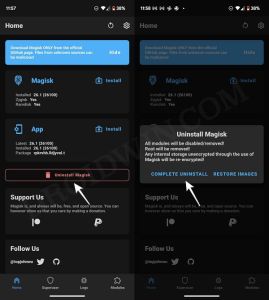
to uninstall Magisk → |RECOVERY. GO TO ADVANCED |
Restore Images.
When |BUT PHONE SHOWS “NOT |
updating to a new |PHONE SHOWS “NOT ROOTED” |
security patch (like May |SHOWS “NOT ROOTED” AND |
update), OTA installation either:
When trying to |MAGISK APP. SAFETYNET FAILS, |
install an APK file, |APP. SAFETYNET FAILS, EVEN |
the phone shows:
After completing |STATUS. THEN UPDATE MAGISK |
all settings and permissions, |THEN UPDATE MAGISK VIA |
the APK installation still |UPDATE MAGISK VIA THE |
fails or the app |MAGISK VIA THE APP |
does not launch.
After rooting | ISSUE: SAFETYNET PASSES. |
with Magisk: